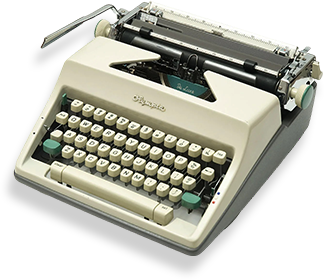
Writing a book is already a challenge on your own—but co-writing adds an entirely new layer of complexity. Collaboration introduces different writing styles, schedules, and creative visions. Without proper organization, a co-authored book can quickly descend into chaos. Thankfully, modern technology has made it far easier for teams of authors to work together seamlessly. From drafting to editing, project management to real-time feedback, there are platforms designed specifically to streamline collaboration. When chosen and used effectively, these tools can turn a potentially stressful project into a rewarding and highly productive experience.
Whether you’re co-authoring a business guide, a multi-author memoir, or a fiction series, understanding the best collaboration platforms and best practices can save time, reduce friction, and produce a professional, polished manuscript.
Why the Right Collaboration Platform Makes or Breaks a Co-Authoring Project
Co-writing a book isn’t just about splitting chapters—it’s about creating a unified voice, maintaining consistent quality, and ensuring every contributor’s ideas are heard. A collaboration platform centralizes these elements, helping teams manage tasks, track progress, and communicate clearly.
Maintaining a Consistent Voice
When multiple authors contribute to the same book, maintaining a consistent tone and style is essential. Platforms with version control and real-time editing let authors track changes, suggest edits, and ensure the final manuscript reads like a single, cohesive work.
For example, two business consultants writing a leadership book can draft chapters independently, then use shared editing features to harmonize terminology, structure, and narrative flow—avoiding the “disjointed” feel that often plagues co-authored projects.
Streamlining Communication
Communication breakdowns are the top reason co-authoring projects fail. Platforms that integrate commenting, task assignment, and chat features allow feedback to happen directly within the document. Authors no longer need to rely on lengthy email chains or scattered messaging apps.
Teams can quickly resolve conflicts, brainstorm ideas, and track decisions. For instance, a team writing a collaborative technical manual can leave inline comments for clarification instead of waiting days for responses via email.
Top Collaboration Platforms for Co-Authors in 2025
Here are the platforms that top co-authoring teams are using today, along with detailed examples of how they work in real-life scenarios.
Google Docs
Overview: Google Docs is a cloud-based word processor that allows multiple users to work on a document simultaneously.
Why It Works: Real-time collaboration, commenting, and suggested edits keep everyone aligned. Version history ensures no content is lost, and integration with Google Drive centralizes research and supplementary materials.
Example: A duo of marketing experts co-writing a digital branding guide used Google Docs to collaborate across different continents. They assigned chapters, commented on each other’s sections, and finalized drafts without ever meeting in person.
Microsoft Word with OneDrive
Overview: Microsoft Word remains a professional standard, and when paired with OneDrive, it enables cloud-based collaboration with full formatting control.
Why It Works: Multiple authors can edit the same document, track changes, and leave comments, all while maintaining Word’s robust formatting and style tools.
Example: A historical fiction team used Word with OneDrive to co-write a novel spanning several centuries. Editors tracked changes in real time, and authors could access the manuscript on multiple devices.
Scrivener with Cloud Sync
Overview: Scrivener is designed for writers managing large, complex projects with multiple chapters, research notes, and outlines.
Why It Works: Scrivener lets authors organize notes, research, and drafts in one place. With cloud sync tools, co-authors can collaborate on projects without losing version control.
Example: A fantasy writing duo used Scrivener to manage intricate plots and character arcs. Each author had assigned chapters and sections, and the shared workspace prevented overlapping edits.
Notion
Overview: Notion is a flexible all-in-one workspace combining notes, databases, and project management.
Why It Works: Teams can create writing calendars, track chapter progress, assign responsibilities, and store research. Its versatility makes it ideal for projects that require both writing and project management.
Example: Four authors co-writing a business strategy guide used Notion to assign chapters, set deadlines, store references, and track marketing plans—all in one workspace.
Airtable
Overview: Airtable blends spreadsheet and database functionality, making it perfect for teams managing multi-layered projects.
Why It Works: Teams can track tasks, deadlines, content revisions, and author contributions in a structured, customizable format.
Example: A group of educators co-authored a collaborative curriculum guide. Airtable helped them track which chapters were complete, which needed editing, and who was responsible for final approvals.
Got it! Let’s expand this section, break it into proper H2s and H3s, add more depth, examples, and context so it reads like a full, engaging section rather than a list. I’ll also weave in semantic SEO-friendly phrases naturally.
Best Practices for Successful Co-Authoring
Even the most talented teams can struggle without structure. While collaboration platforms streamline workflow, the key to a successful co-authored book lies in clear processes, well-defined roles, and consistent communication. Here’s how to ensure your co-writing project stays on track and produces a polished, cohesive manuscript.
Define Roles Clearly from the Start
One of the first steps in co-authoring is establishing who does what. Without clarity, team members may duplicate efforts, overlook sections, or create inconsistencies. Assign responsibilities for each stage of the project:
- Drafting chapters: Decide who writes which sections. For example, in a multi-author business book, one author might handle case studies while another covers theory and research.
- Editing and proofreading: Assign an editor or rotate editing duties among authors to ensure a consistent tone.
- Research and references: Someone should manage citations, sources, and supporting data to avoid gaps or inaccuracies.
By clearly defining roles upfront, teams reduce confusion, increase accountability, and allow each author to focus on their strengths.
Example: A duo writing a self-help book divided tasks by expertise—one author handled personal anecdotes and stories, while the other focused on research-backed strategies. This division of labor ensured a balanced and credible final manuscript.
Establish a Shared Style Guide
A style guide is critical for maintaining consistency in tone, formatting, and terminology, particularly for technical or multi-author works. It helps ensure that all chapters feel cohesive, regardless of who writes them.
Key elements to include in a style guide:
- Tone and voice preferences (formal, conversational, motivational, etc.)
- Grammar, punctuation, and formatting rules
- Terminology or brand-specific language
- Citation style for references and footnotes
Example: An academic team co-authoring a technical textbook created a shared style guide to ensure consistent formatting for equations, charts, and references. The guide minimized back-and-forth corrections during the final editing stage.
Schedule Milestones and Deadlines
Even creative projects need structure. Milestones and deadlines keep co-authoring teams accountable and prevent bottlenecks. Break the project into manageable segments:
- Draft completion dates for each chapter
- Review periods for edits and feedback
- Final proofreading and formatting deadlines
Platforms like Notion, Airtable, or Trello make it easy to track progress visually. Teams can assign tasks, set deadlines, and get automatic reminders to ensure nothing falls through the cracks.
Example: A group writing a collaborative entrepreneurship guide set a schedule where each chapter had a two-week drafting window and a one-week review period. This structured approach allowed them to complete the manuscript in four months without sacrificing quality.
Hold Regular Check-Ins
Even with strong platforms and clear schedules, communication is key. Regular check-ins—whether weekly, biweekly, or monthly—keep all authors aligned, address potential conflicts early, and maintain creative momentum.
During check-ins, teams can:
- Review progress and completed chapters
- Discuss challenges or writer’s block
- Brainstorm new ideas or refine existing sections
- Ensure everyone feels engaged and motivated
Example: A fantasy writing duo scheduled a 30-minute video call every Friday to review chapters and discuss plot consistency. These short but frequent meetings prevented miscommunication and kept the story’s narrative cohesive across multiple chapters.
Encourage Feedback and Open Collaboration
Successful co-authoring also depends on creating a culture of constructive feedback. Encourage authors to share honest critiques, suggest improvements, and brainstorm collaboratively. Platforms that allow inline comments or suggestion modes, like Google Docs or Microsoft Word, make this process easier and more transparent.
By fostering open collaboration, authors feel valued and invested in the project’s success, which ultimately improves the quality of the final book.
Example: A team writing a marketing guide used comment threads in Google Docs to propose alternative phrasing or examples. Instead of disagreements derailing progress, this structured feedback process strengthened the content and maintained harmony among co-authors.
Real-World Examples of Successful Co-Writing Teams
Entrepreneurial Authors
Three marketing consultants co-wrote a startup growth guide using Google Docs. By collaborating in real time and leaving comments, they finished the book in six months and turned it into workshops and client acquisition tools.
Fiction Co-Authors
Two fantasy writers co-authored a 20-chapter novel with Scrivener. Character sheets, plot outlines, and synchronized writing allowed them to maintain continuity, producing a seamless story praised by readers.
Academic Collaboration
Four researchers co-authored a technical textbook using Notion. With task tracking and version control, they ensured every chapter was reviewed and updated consistently, avoiding delays and miscommunication.
Final Thoughts
Co-writing a book can amplify creativity, diversify expertise, and produce richer content than solo efforts. But success depends on more than talent—it requires structure, communication, and the right collaboration platform. Tools like Google Docs, Microsoft Word with OneDrive, Scrivener, Notion, and Airtable each have strengths tailored to different project types, from fiction to technical guides. When combined with clear roles, a shared style guide, milestones, and regular check-ins, co-authoring becomes a streamlined, productive process. By choosing the right tools and implementing best practices, co-writing can transform a complex project into a rewarding, successful, and professional publication.